
 EN
EN
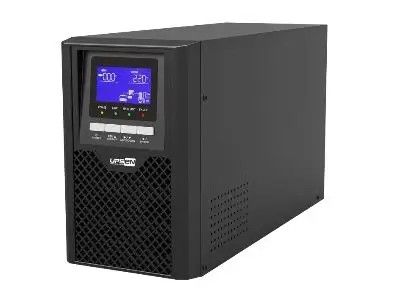
When you have a server, it's important to keep it running even when the power goes out. One way to do this is by using a UPS, or Uninterruptible Power Supply. A UPS can provide backup power, so your server stays on during a blackout. The amount of time a UPS can keep your server running depends on several factors, like the power needs of the server and the size of the UPS.
How to Determine the Ideal UPS Backup Time for Your Server Needs
To find out how long a UPS can back up your server, start by figuring out how much un interrupted power supply for home your server uses. This is usually measured in watts. You can find the wattage on the server’s label or in the manual. Once you know the wattage, you can choose a UPS that provides enough backup time. For example, if your server uses 500 watts and you want it to run for one hour during a power failure, you need a UPS that can handle at least 500 watt-hours. There are UPS systems that can last longer if they have larger batteries.
Where to Find the Best UPS Power Supply with Long Backup Times
Finding the right UPS with long backup times is essential. One good place to start is by visiting the UPSEN website, where you can find various UPS options. UPSEN offers different models that can provide backup times ranging from a few minutes to several hours, depending on your needs. When looking for a UPS, check the specifications to see how much wattage it can support and how long it can run. Read customer reviews to get an idea of how well the UPS performs in real situations.
Quality
When the power goes out, it can be a big problem for servers. A server is a special computer that helps run websites, apps, and more. To keep servers running during un interrupted power supply unit many people use a UPS, which stands for Uninterruptible Power Supply. But how long can a UPS keep a server running when the electricity is gone? The answer is not simple. It depends on a few things. First, the size of the UPS matters. A bigger UPS can hold more power, so it can keep the server running longer. For example, a small UPS might keep a server running for just a few minutes, while a larger one could work for several hours. Next, how much power the server uses is important too. If a server needs a lot of electricity, the UPS will run out of power faster.
Application
When choosing a UPS for your server, there are several things to think about. First, you need to know how much UPS power supply for home your server uses. You can usually find this information in the server's manual or on a label on the server itself. Once you know how much power your server needs, look for a UPS that can provide enough power for that amount. UPSEN has various models that can help you find the right one for your server's needs. Another thing to consider is the runtime you want. If you expect long power outages, you may need a UPS that can keep your server running for hours. This might mean investing in a larger UPS that costs more but provides longer backup time.
Conclusion
To get the most out of your UPS and maximize backup time for your server, there are some best practices you can follow. First, regularly check the battery of your UPS. Just like a flashlight battery, the UPS battery can wear out over time. Make sure to replace it when needed to keep your UPS working well. UPSEN offers tips on how to maintain your UPS battery properly. Another tip is to keep your server and UPS in a cool, dry place. Heat can harm the battery and reduce its life. Make sure there’s good airflow around both the server and the UPS to prevent overheating. It’s also wise to limit the number of devices connected to your UPS.