
 EN
EN
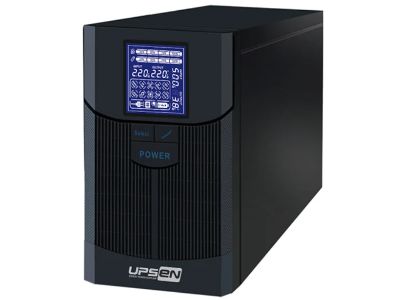
Every device that needs power can benefit from a UPS, or Uninterruptible Power Supply. This is especially true for computers and important machines in businesses. A UPS helps keep things running even when the power goes out. But how do we make sure the UPS can communicate with other devices? This is where communication ports come into play. The communication port is like a bridge that lets the online ups power supply talk to your computer or other equipment. At UPSEN, we understand how essential it is for these connections to be simple yet effective. Choosing the right communication port is crucial so that everything works smoothly
How to Choose the Right Communication Port for Your UPS Power Needs
When selecting a communication port for your ups power supply, several factors need to be considered. First, think about what devices you want to connect. Different devices may require different ports. For instance, if you have a computer, you might choose a USB port. USB ports are common and easy to use. They help the UPS send alerts or power statuses to the computer. Another option could be a serial port. This type is often used for older devices, which still play important roles in many industries. If you are working with newer technology, you might want to consider Ethernet ports. These types of connections allow for network communication. This can be very useful in larger setups, like in offices or factories where multiple UPS units are in use Next, consider the distance between the UPS and the connected devices. If they are far apart, a longer cable or a specific type of port may be needed. Some ports may not work well over long distances. While USB ports are great for short distances, Ethernet cables can reach longer distances without losing quality. Additionally, think about future needs. If you plan to add more devices later, it might be smart to choose a UPS with multiple communication ports. This way, you won't need to buy a new UPS later. Finally, check the compatibility of the UPS with your devices. Not all UPS units work with every device. Always read the specifications to ensure that the communication port you choose matches your needs. At UPSEN, we offer a range of UPS models with different communication options, making it easier for you to find what fits best
What Are the Best Practices for Connecting UPS Power Communication Ports
Once you have chosen the right communication port, it's important to connect everything properly. First, always read the user manual for both the ups power and the device you are connecting. The manual often has important details about the best ways to connect. When you are ready to connect, make sure the UPS is turned off. This can prevent any electrical issues or damage to your devices. After that, carefully plug in the communication cable. Do not force the cables into the ports; they should fit snugly but not too tightly. Once connected, turn on the UPS and the device. Check to see if they recognize each other. This is usually shown by lights or alerts on the devices. If they don’t connect, double-check the cables and ports to ensure everything is secure. Another important practice involves keeping the area around the UPS clean and organized. Dust and dirt can affect performance. Make sure that cables are not tangled and are away from heavy foot traffic to avoid tripping hazards. Regularly inspect the cables and ports for any signs of wear or damage. If you notice something odd, replace the cables as soon as possible. Moreover, ensure that you have the right software installed if your UPS requires it. Some UPS units come with software to monitor power usage or to set alarms. This can help you stay informed about your power supply’s status. Using the software correctly means you can catch problems early. At UPSEN, we provide software that works seamlessly with our UPS units, making the entire process easier for our users
How Do Different Communication Ports Impact UPS Performance
When you think about a UPS, or Uninterruptible Power Supply, one important part is how it talks to your devices. This is where communication ports come in. A communication port is like a door that lets information flow between the UPS and your computer or other devices. Different ports can have a big impact on how well your UPS works. For example, some UPS systems have USB ports. This is great because many computers can easily connect to them. When your computer connects to the UPS through a USB port, it can get information about the power. If there is a power outage, the UPS can send a signal to your computer to save your work and turn off safely. This helps prevent data loss. Other UPS systems might use serial ports. These ports are a bit older, but they still work well for some setups. A serial port can connect to older computers or specialized equipment, making it useful in businesses that haven’t upgraded their technology. Another important type of port is the network port. This is used for connecting the UPS to a network, allowing multiple devices to communicate with the UPS at once. When a UPS is part of a network, it can monitor power for many devices at the same time. This is especially helpful in offices where many computers are in use. The UPS can send alerts if there is a problem, so everyone knows what to do. At UPSEN, we understand that having the right communication port can make a big difference in how well a UPS performs. Choosing a UPS with the right ports for your needs is important. If you have newer devices, look for a UPS with USB or network ports. If you’re using older technology, consider a UPS with serial ports. The right communication port helps ensure that your UPS can keep your devices running safely during a power outage
What Wholesale Options Are Available for UPS Power Communication Ports
When it comes to buying UPS systems, there are many options available, especially if you're looking to buy in bulk or wholesale. This is important for businesses or schools that need several UPS units. Understanding the different communication ports available can help you make the best choice for your needs. At UPSEN, we offer a variety of UPS systems with different communication ports. If you are buying many units, it’s a good idea to consider what ports you need. For example, if your organization uses many computers, you might want to choose UPS systems that come with USB ports. This way, when you connect your computers to the UPS, they can easily communicate with each other. Another option is to look for UPS systems that have network ports. This is especially useful if you have a lot of devices that need power protection. A network-connected UPS can handle multiple devices at once, making it easier to manage power for the whole office or school. When buying in bulk, you may also get discounts. This can save your organization money while ensuring all your devices have power protection. It’s also important to check if the UPS systems come with the software you need. Some UPS systems include special software that helps you monitor power usage and alerts you if there are any issues. This software is often connected through the communication ports. Make sure that the UPS you choose can work with the software you already use or that it comes with its own easy-to-use program When considering wholesale options for UPS systems, think about what communication ports will work best for your situation. At UPSEN, we are here to help you choose the best UPS systems for your needs, making sure all your devices stay safe and powered
What Are the Latest Trends in UPS Power Communication Technologies
The world of technology is always changing, and that includes UPS systems. New communication technologies are making UPS units smarter and more efficient. At UPSEN, we keep up with these trends so we can offer the best options for our customers. One of the latest trends is the use of IoT, or the Internet of Things. This technology allows devices to connect to the internet and communicate with each other. For UPS systems, this means they can send alerts or updates directly to a smartphone or computer. If there is a power issue, the UPS can notify you instantly, even if you're not in the office. This helps you respond quickly to problems, keeping your devices safe Another trend is the development of smart UPS systems that use advanced software. These systems can monitor power usage in real-time. They can analyze the data and provide insights into how much power you are using and when. This information can help businesses save money and make better decisions about their power needs. Smart UPS systems can also predict when maintenance is needed, helping prevent problems before they happen. Wireless communication is also becoming more popular in UPS technology. Some new UPS models can connect without wires, making installation easier. This can be especially useful in places where running cables is difficult. Wireless communication can still provide alerts and updates, keeping you informed about the status of your power supply.
Table of Contents
- How to Choose the Right Communication Port for Your UPS Power Needs
- What Are the Best Practices for Connecting UPS Power Communication Ports
- How Do Different Communication Ports Impact UPS Performance
- What Wholesale Options Are Available for UPS Power Communication Ports
- What Are the Latest Trends in UPS Power Communication Technologies